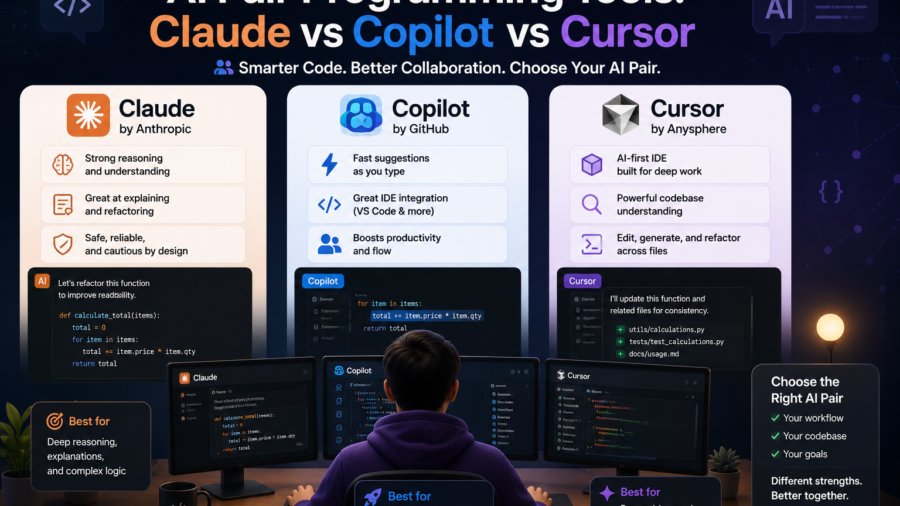
AI pair programming tools have moved from experimental to essential. Three tools dominate the space: Claude Code, GitHub Copilot, and Cursor. Each takes a fundamentally different approach to AI-assisted coding. Choosing the right one depends on your workflow, your team’s needs, and how much control you want over the AI’s capabilities.
In this comparison, we break down the strengths and weaknesses of each tool based on real-world usage in 2026.
Tool 1: Claude Code
Claude Code is Anthropic’s terminal-based AI coding assistant. It runs directly in your command line, reads your codebase, and helps you write, review, and refactor code.
How Claude Code Works
Claude Code operates as a CLI agent. It scans your project files, understands the codebase context, and assists with coding tasks. Unlike autocomplete tools, Claude Code can execute multi-step plans: refactoring a module, writing tests, and updating documentation in sequence.
Strengths
Claude Code’s biggest advantage is deep codebase understanding. Because it reads your entire project, it can make changes that respect your existing patterns and architecture. It handles complex multi-file edits that autocomplete tools cannot.
The plugin and skills system is another major strength. You can extend Claude Code with custom slash commands, MCP servers, and hooks that automate repetitive tasks. Our guides on Claude Code skills and plugins and advanced Claude Code patterns cover this extensibility in depth.
Considerations
Claude Code requires a terminal-first workflow. If your team primarily uses GUI-based IDEs or web-based editors, the CLI-first approach may feel like a step back. It also requires an API key or Claude subscription for full functionality.
Tool 2: GitHub Copilot
GitHub Copilot is the most widely adopted AI coding assistant. It integrates directly into Visual Studio Code, JetBrains IDEs, and other popular editors as an autocomplete and chat tool.
How GitHub Copilot Works
Copilot operates in two modes. Autocomplete mode suggests code as you type, similar to an advanced version of traditional autocomplete. Chat mode lets you ask questions about your code, generate functions from descriptions, and get explanations of complex code.
Strengths
Copilot’s autocomplete is fast and low-friction. It requires zero changes to your existing workflow. Type a comment describing what you want, and Copilot fills in the code. For simple tasks like writing boilerplate, creating test stubs, or implementing well-known patterns, Copilot is extremely efficient.
Integration with GitHub’s ecosystem is another strength. Copilot can access your GitHub repositories, pull request history, and documentation to provide context-aware suggestions that understand your project.
Considerations
Copilot works best within supported IDEs. Its autocomplete can occasionally propose code that looks correct but contains subtle bugs. Reviewing Copilot suggestions carefully remains essential. Some teams also report that Copilot’s context window is limited compared to tools that scan the full codebase.
Tool 3: Cursor
Cursor is a fork of Visual Studio Code with deeply integrated AI capabilities. It positions itself as an AI-native IDE rather than an AI add-on to an existing IDE.
How Cursor Works
Cursor embeds AI directly into the editor experience. It offers AI-powered autocomplete, a chat sidebar for code Q&A, and an agent mode that can make multi-file changes. The key difference is that the AI features are built into the IDE itself rather than added as extensions.
Strengths
Cursor’s agent mode is its standout feature. It can understand your entire codebase and make coordinated multi-file changes, similar to Claude Code but within a GUI IDE. For developers who prefer visual interfaces over terminals, Cursor delivers similar capabilities with a familiar editing experience.
The Composer feature allows you to describe changes in natural language and see Cursor implement them across multiple files. This is particularly useful for refactoring tasks, adding features to existing code, and migrating code between patterns.
Considerations
Cursor requires switching from your current IDE to a fork of VS Code. If you have heavily customized your VS Code setup, migrating to Cursor means rebuilding your configuration. Cursor’s pricing model also separates it from free tools like GitHub Copilot for individual developers.
| Feature | Claude Code | GitHub Copilot | Cursor |
|---|---|---|---|
| Interface | Terminal CLI | IDE extension | AI-native IDE fork |
| Context model | Full codebase scan | Current file + repo context | Full codebase + IDE context |
| Multi-file editing | Yes, planned agent actions | Limited | Yes, agent and composer modes |
| Extensibility | Skills, MCP, hooks | GitHub Actions, custom models | Extensions marketplace |
| Best for | Complex refactoring, full-stack tasks | Fast autocomplete, boilerplate | GUI users wanting AI-first IDE |
| Learning curve | Moderate (CLI required) | Low | Low to moderate |
How to Choose the Right Tool
The best tool depends on your specific situation. Here is a decision framework.
Choose Claude Code If
You work comfortably in the terminal and need deep codebase understanding for complex refactoring or architectural changes. The skills and plugin system lets you customize the tool for your team’s specific workflows. For a complete setup guide, see our Claude Code developer guide.
Choose GitHub Copilot If
You want the lowest-friction AI assistance that fits into your existing IDE workflow. Autocomplete that helps you write code faster without changing your habits. Copilot is ideal for individual developers and teams already using the GitHub ecosystem.
Choose Cursor If
You prefer a GUI IDE but want deep AI integration. Cursor gives you AI-native features without the terminal learning curve. The agent and composer modes handle multi-file changes that would take hours manually. For team collaboration patterns, see our guide to AI pair programming for remote teams.
Pro Hint
Many teams use multiple tools together. Use Copilot for day-to-day autocomplete, switch to Claude Code for complex multi-file refactoring tasks, and use Cursor when you need visual debugging alongside AI assistance. The tools complement each other rather than competing outright.
Performance Comparison
Code Quality
All three tools generate code that requires review. Claude Code’s full codebase context tends to produce more consistent code that matches existing patterns. Copilot excels at common patterns and boilerplate. Cursor’s agent mode handles structural changes well within the IDE context.
Speed
Copilot’s autocomplete is near-instant because it runs locally in the editor. Claude Code and Cursor require API calls for their more advanced features, introducing slight latency. For real-time autocomplete, Copilot has the edge. For complex reasoning tasks, the small latency is worth the higher quality results.
Cost Considerations
Claude Code requires a Claude API subscription or Max plan. GitHub Copilot is available as an individual subscription or free through GitHub’s student and open source programs. Cursor offers a free tier with usage limits and paid tiers for heavier usage.
For teams, cost per developer matters. Calculate the total cost of ownership including tool subscriptions, the time saved per developer, and any additional infrastructure (like API keys for Claude Code). Track these costs over time to measure actual ROI. Our guide on measuring ROI of AI pair programming covers the full framework.
Frequently Asked Questions
GitHub Copilot is the easiest starting point. It requires zero workflow changes, works in popular IDEs, and its autocomplete mode is intuitive for developers new to AI-assisted coding. Cursor is also beginner-friendly if you prefer a visual IDE experience.
For complex multi-file refactoring, architecture changes, and tasks requiring deep codebase understanding, Claude Code has an advantage due to its full codebase scanning and agent capabilities. Copilot excels at line-level autocomplete and simple code generation.
Yes, many developers use Copilot for autocomplete and Claude Code or Cursor for complex tasks. The tools complement each other rather than competing. Using both gives you low-friction suggestions for simple tasks and powerful agents for complex ones.
Cursor is based on VS Code but is a separate product. It has its own licensing model with a free tier for individual use and paid tiers for teams. Your existing VS Code extensions may or may not work in Cursor depending on compatibility.
Claude Code is a terminal-based agent that scans your full codebase and performs multi-step tasks. GitHub Copilot is an IDE extension focused on real-time autocomplete and inline chat. Claude Code handles complex workflows. Copilot excels at fast, low-friction code suggestions.
Copilot: $10-19/month per individual, free for students. Cursor: free tier available, paid tiers for heavy usage. Claude Code: requires Claude API subscription or Max plan. For teams, calculate total cost of ownership including time saved per developer.