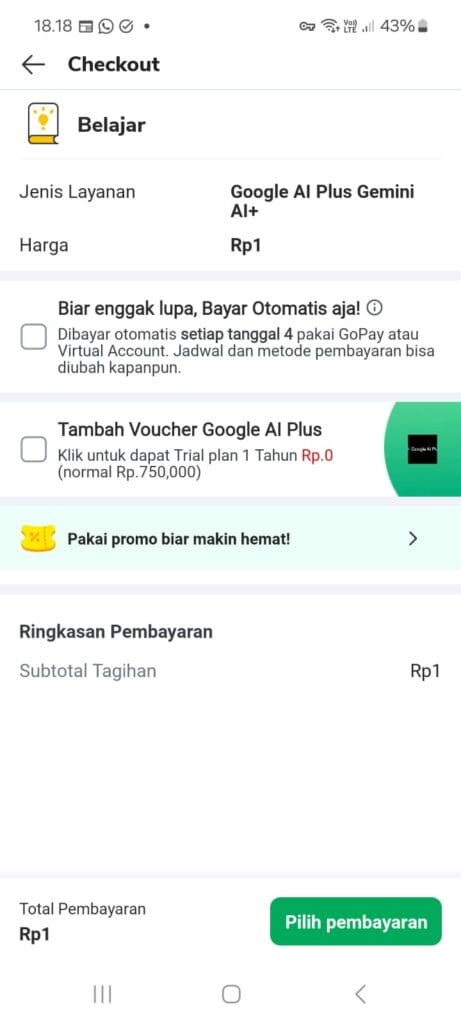
Google AI Plus (Gemini AI+) is being offered for just 1 Rupiah through a Tokopedia mobile promotion, giving eligible accounts a full month of Google’s premium AI subscription for effectively free.
About This Offer
Google AI Plus bundles the Gemini AI+ experience: access to Google’s latest Gemini models, higher usage limits, and integration across Gmail, Docs and other Workspace apps. The promo is delivered through Tokopedia’s mobile app as a 1 Rupiah coin purchase, which is why the claim must be done on a phone rather than a desktop browser.
What You Get
- Google AI Plus (Gemini AI+) subscription for 1 Rupiah
- Access to Google’s newest Gemini models on the web and in mobile apps
- Higher daily usage limits than the free Gemini tier
- AI features integrated into Gmail, Docs and other Google Workspace tools
Visit Tokopedia to Claim Google AI Plus for 1 Rupiah
How to Claim
- Make sure the Tokopedia mobile app is installed and you are logged in on your phone.
- Open this link on the same phone: tokopedia.onelink.me/2ZX3/gemini-binus
- Complete the 1 Rupiah purchase and finish the claim flow in the app.
- Follow the confirmation prompt to activate Google AI Plus on your Google account.
Important Notes
- Availability is not guaranteed. Eligibility can depend on your account status, region and Tokopedia history, so it may work on some accounts and not others.
- The offer must be claimed from the Tokopedia mobile app. Opening the link on a desktop browser will not complete the purchase.
- The promo price is 1 Rupiah; check the final total in the cart before confirming, in case additional fees apply.
- Keep an eye on the subscription end date so you can decide whether to renew at the normal price.
Frequently Asked Questions
Do I need a credit card for this deal?
No. The promo is a 1 Rupiah purchase made inside the Tokopedia app, so it is paid through your normal Tokopedia balance or payment method rather than a card entered on Google’s site.
Why does the link not work on my laptop?
The offer is mobile-only. Install the Tokopedia app on your phone, log in, and open the link from there instead.
What happens if the promo does not appear?
Availability depends on your account condition, so the offer may simply not be shown to every user. If it does not appear, there is nothing to fix on your end, and it is worth checking again later.